The title page is the first thing a reader sees when they open your book, and it is also the page most self-published authors get subtly wrong. It looks simple — a title, an author name, maybe a publisher imprint — but the title page follows rules the publishing trade has refined over centuries, and breaking them makes a book feel amateur before the story begins. This guide shows you exactly how to format a book title page for self-publishing in 2026: what goes on it, what stays off it, where it sits in the book, and the typography, layout, and spacing standards that make it look like it came from a real publisher.
By the end, you will know the difference between a full title page and a half-title page, exactly which elements belong on each, how to set the type so it balances on the page, how series and edition lines work, how ebook title pages differ from print, and which mistakes to avoid before you upload your file.
Quick answer: To format a book title page for self-publishing, place the full title, subtitle, author name, and publisher imprint (with city) on a centered, right-hand (recto) page, with the title in the upper third in a larger size of the interior font (about 18 to 24 points). Leave off page numbers, running heads, and decoration. The formula: the right elements, the right page, and restraint.
In this guide
- What a Book Title Page Is (and Why It Matters)
- Full Title Page vs Half-Title Page
- What Goes on a Book Title Page (and What Does Not)
- Standard Layout: Page Position and Placement
- Typography: Fonts, Sizes, and Spacing
- Series Name, Edition Lines, and Author Variants
- Ebook Title Pages vs Print Title Pages
- The Copyright Page That Follows the Title Page
- Common Mistakes When You Format a Book Title Page
- Your Title Page Checklist
- Frequently Asked Questions
- Conclusion: Small Page, Big Signal
What a Book Title Page Is (and Why It Matters)
A book title page is the interior front-matter page that carries the full title, subtitle, author name, and publisher or imprint name — it is the page libraries, booksellers, and catalogues cite when they record the book. It is not the cover, and it is not the copyright page. It is the quiet, formal page near the front of the book that states, without ornament, what the book is and who made it.
Why does it matter? Every gatekeeper in publishing looks at it. Distributors use it to verify the bibliographic record; libraries catalogue from it; award judges check it. Readers form an impression of your professionalism in the seconds it takes to turn the page. A clean title page signals craft; a sloppy one signals the opposite before chapter one has a chance to recover.
The title page also carries commercial weight: it states the exact wording of the title and the author name as they should appear in the metadata. If your cover, title page, and copyright page disagree, stores and ISBN databases read it as sloppiness at best and a different edition at worst. Consistency starts on the title page.
Full Title Page vs Half-Title Page: What Is the Difference?
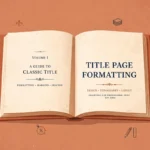
Trade books have two title pages, and knowing which is which is the mark of a properly formatted interior. The difference between a half-title page and a full title page is simple: the half-title page carries only the title (sometimes with the subtitle), while the full title page carries the full title, subtitle, author name, and publisher imprint.
The half-title page (also called the bastard title) comes first, usually the first page after the cover, and prints the title alone, in modest type, centered. Traditionally it protected the expensive full title page from wear; today it gives the book a moment of ceremony before the information begins. Many trade paperbacks and all hardcovers include one; short books often skip it.
The full title page comes next, after the half-title and before the copyright page, and carries everything. When people say “format a book title page,” this is the page they mean. The full title page is required in every properly formatted print book; the half-title is traditional but optional. Both pages belong to the front matter — our front matter and back matter guide maps the full trade sequence they sit within.
Exactly What Goes on a Book Title Page (and What Does Not)
A full title page carries a fixed set of elements, and nothing else. Here is exactly what goes on a book title page: the full title exactly as it appears on the cover, the subtitle on its own line if the book has one, the author’s name as it appears in the book’s metadata, and the publisher or imprint name — with the city of publication — near the bottom of the page.
That is the complete list: four groups of information, in this order from top to bottom — title, subtitle, author name, publisher imprint. Each separated by generous white space. Nothing else.
What does not go on a title page is just as important. No page number — the title page is never foliated. No running head. No ISBN (copyright page and back cover only). No copyright notice, no “First Edition” banner, and no decorative borders or flourishes. The title page earns its authority through restraint: type, space, and nothing else.
The author name deserves special care. Print it exactly as it appears in the metadata — your ISBN record, your store listing, your copyright registration. The byline must match the copyright page and the cover byline character for character, or you will create cataloguing headaches that are entirely avoidable.
The Standard Layout: Page Position and Placement
A book title page always goes on a recto page — a right-hand page, an odd-numbered page. It is typically the third page of the book (half-title, copyright, title page) or the fifth (half-title, frontispiece, copyright, title page). It must never appear on a verso (left-hand) page. If your front matter pushes it onto an even page, insert a blank page before it — a wrong-side title page is one of the fastest giveaways of an unprofessionally formatted interior.
Vertical placement: the title sits in the upper third. The classic rule: the title block occupies the top half, the author name sits at or just below the vertical middle, and the imprint is anchored near the bottom. The eye reads down in three acts: the book, the author, the publisher. Generous white space between the groups is the signal of a quality edition.
Horizontal placement: everything is centered on the text measure, not the physical page width (on books with asymmetric margins, centering on the page pushes the type visibly off-center). This is the one place in a book where centered type is required; a left-aligned title page reads as a mistake.
Typography: Fonts, Sizes, and Spacing
The font rule: the title page uses the same typeface family as the interior body text. If the book is set in Garamond, the title is set in Garamond. Do not introduce a decorative display font that appears nowhere else in the book — that mismatch is a classic self-publishing tell. Display faces belong on covers, not on interior title pages.
Sizes follow a clear hierarchy. The title is set at roughly 18 to 24 points — about double the body size — in the roman cut of the interior font, sometimes with slightly wider letter-spacing. The subtitle, if any, is set noticeably smaller, around 13 to 15 points, often in italics. The author name is set at about 14 to 16 points, with wider spacing above it than below it. The imprint line — publisher name and city — is set small, around 10 to 11 points. Bold the title only if the interior design demands it; in most trade settings, size and space do all the emphasis work.
Spacing between the groups is where quality shows. A common proportion: the title sits about one-third down the page from the top of the text block, the author name sits at about the vertical middle, and the imprint sits about an inch above the bottom text margin. In your layout program, use paragraph spacing (Space Before/Space After) rather than blank paragraphs to create these gaps — blank paragraphs carry invisible risk when styles reflow.
Series Name, Edition Lines, and Author Variants
If the book belongs to a series, the series name typically goes either at the very top of the title page in small type above the title (“The Mariner Chronicles, Book Two”) or on the copyright page only. Keep it small (10 to 11 points) and unobtrusive so it does not compete with the title.
Edition information goes on the copyright page, not the title page. “Second edition” and edition dates are copyright-page statements. If a title is deliberately published as a new edition with a substantially new title page, the edition statement may appear below the title — but even then, the copyright page carries the canonical record.
Author variants need care. For a co-authored book, the names appear together — “Name One and Name Two” — and the order and spelling must match the cover and the metadata exactly. For edited volumes, the title page reads “Edited by Name” beneath the title. For translations, “Translated by Name” follows the author line. In every case, the title page mirrors the byline contract of the book: whoever the metadata says the author is, that is whose name the title page carries.
Ebook Title Pages vs Print Title Pages
Ebooks have title pages too, but the format changes with the medium. The difference between ebook and print title pages: an ebook title page is a centered, screen-sized section in the reflowable file, while a print title page is a fixed-position page in a paginated PDF. An ebook title page carries the same four elements — title, subtitle, author, imprint — but it needs no recto/verso logic and no print margins.
Build the ebook title page as a simple, centered section with the same font family as the ebook body. Do not embed a fixed-layout image of the print title page: images of text cannot resize, they blur on high-DPI screens, and they break screen readers. The exception is a children’s picture book where the artwork is the point — in standard trade ebooks, typeset the title page; don’t picture it. And never replace the real, reflowable title page with an image in the EPUB itself.
The Copyright Page That Follows the Title Page
The copyright page sits immediately after the full title page — on the verso (left-hand) page facing it in print. Together they form the legal and bibliographic heart of the book: the title page identifies the book, the copyright page documents it. If you are building the front matter, treat these two pages as a pair and get both right.
The copyright page carries the copyright notice (© year, rights holder name), the edition statement, the publisher’s address, the ISBN for that format, printing history, credits, and the standard permissions disclaimer. Our dedicated guide to copyright page formatting covers each of these elements in detail — read it alongside this guide when you lay out the front matter.
One hard rule for the pair: the title page and the copyright page must agree on everything they share — title wording, author name spelling, publisher name, and edition. Discrepancies between the two tell a librarian or a bookstore buyer that the book was not professionally produced. Proofread the two pages together, not separately.
Common Mistakes When You Format a Book Title Page
Authors make the same handful of title page errors. The common mistakes: putting a page number on the title page (never foliated — no folio, no running head), placing it on a verso page (it must be recto — right-hand, odd-numbered), using a different font than the interior, and mismatching the title or author name with the cover and metadata.
More subtle errors: cramming the elements together so the page looks crowded (white space is the quality signal), adding decorative borders or clipart, forgetting the city in the imprint line — and, most embarrassing of all, uploading a manuscript where the title page still carries the working title. Authors revise titles late and forget the title page. Before you export, confirm the title page, cover, copyright page, and metadata all carry the same final wording. This mistake takes thirty seconds to check.
Your Title Page Checklist
Run through this title page checklist before you export your file:
- Title wording matches the cover and metadata exactly
- Subtitle on its own line if the book has one
- Author name spelled exactly as in the metadata
- Publisher imprint and city present near the bottom
- Page sits on a recto (right-hand, odd-numbered) page
- Title in the upper third, author at the vertical middle, imprint near the bottom
- All type centered on the text measure
- Interior typeface family throughout — no display fonts
- No page number and no running head
- Generous white space between the three groups
- Series name included if applicable (small, above the title)
- The copyright page agrees with it on every shared detail
A title page that passes this checklist will never embarrass you: quietly, correctly, and with authority. Pair it with a properly set dedication page and the front matter is complete.
Frequently Asked Questions
Conclusion: Small Page, Big Signal
The title page is the smallest unit of book design that carries the largest signal. Librarians, booksellers, and distributors study it; readers feel its quality in the seconds before chapter one. The best way to format a book title page is to think in terms of hierarchy, not decoration: right elements, right page, right type, and restraint. Build it once, build it right, and your book opens like a book from a real publisher — because it is one.
Get a title page that looks like it came from a real publisher
ArrowUpz formats complete front matter to trade standards — full title pages, half-title pages, copyright pages, and dedication pages set in your interior typeface with correct recto/verso placement, spacing, and imprint lines, for both print and ebook.
Basic Formatting — $97 per book
Professional Formatting — $147 per book
Premium Formatting — custom quote